 Scrubs
On most Macs: start here
If you don't write software, the big ones are usually your own files and the places apps keep copies of them. Start with Storage settings (System Settings › General › Storage) and click ⓘ next to each category, then check these:
~/Library/Messages/Attachments keeps every photo and video anyone sent you. Storage settings › Messages lists the largest; Messages can keep messages for 1 year or 30 days instead of forever.~/Library/Application Support/MobileSync/Backup. A full backup is roughly the size of the phone's data, and old phones' backups stay. Delete them in Finder › your device › Manage Backups./Library. If you don't make music, they can go; the apps download them again.If your Mac has already said its disk is full, see what to do when Mac storage is full first.
First: why the numbers disagree
Finder, Storage settings and Terminal often report different free space, and deleting a big file sometimes frees nothing. Five reasons, all in how macOS and APFS count:
df -h counts 1 GiB as 1,073,741,824. On this Mac, df -h / said 90Gi free and Storage settings said 97 GB. Same space.df shows only what is free right now. When Finder shows much more than df, the difference is purgeable.tmutil listlocalsnapshots / lists them; tmutil thinlocalsnapshots / 50000000000 4 asks macOS to free up to 50 GB of them now.On a developer's Mac: where the space was, and how to clear each
Sorted by size on the Mac we measured. "Comes back" says what happens after you delete it, which decides whether clearing it is worth it.
| Here | What it is | Comes back? | Clear it with |
|---|---|---|---|
| 35.1 GB | Simulator runtimes /System/Library/AssetsV2/com_apple_MobileAsset_*SimulatorRuntime and /Library/Developer/CoreSimulator/CryptexOne compressed disk image per iOS or watchOS version: iOS 18.6 (8.2 GB), 27.0 (7.5 GB), 27.1 (7.3 GB), watchOS 27 (3.6 GB), and an 8.5 GB image that simctl no longer lists, likely left from a beta. Don't measure /Library/Developer/CoreSimulator/Volumes: those are the images mounted, and du there counts their uncompressed contents, 43.2 GB here. | Only if you download that version again | xcrun simctl runtime list -v shows each one's real size; xcrun simctl runtime delete <id> or Xcode › Settings › Components removes it |
| 27.1 GB | Android emulators ~/.android/avdFive virtual devices, 2.2 to 10.6 GB each. Each keeps its own disk, apps and snapshots. | No; you recreate the device | Android Studio › Device Manager › Delete, or avdmanager delete avd -n <name> |
| 26.5 GB | iOS DeviceSupport ~/Library/Developer/Xcode/iOS DeviceSupportDebug symbols Xcode copies from every iOS version you have run on a real device. Here: 4 versions, about 6.7 GB each. | Yes, the next time a device on that version connects | Delete the folders of versions you no longer debug |
| 23.8 GB | Simulator devices ~/Library/Developer/CoreSimulator/Devices47 simulators, 29 of them for runtimes no longer installed. The largest held 8.0 GB of app data. | No | xcrun simctl delete unavailable removes the orphans; Device › Erase All Content and Settings empties the rest |
| 23.3 GB | JetBrains IDEs ~/Library/Caches/JetBrains (15.4) and ~/Library/Application Support/JetBrains (7.9)Indexes and settings, one folder per IDE version. Old versions stay after an upgrade. | Indexes rebuild on the next open | Delete the folders of versions you no longer have, or File › Invalidate Caches |
| 12.8 GB | Gradle ~/.gradleDownloaded dependencies and build caches (10.5 GB) and JDKs it fetched (1.5 GB). | Yes, downloaded again on the next build | ./gradlew --stop, then delete ~/.gradle/caches |
| 11.3 GB | An AI app's virtual machine ~/Library/Application Support/<app>/vm_bundlesDesktop AI apps that run tools in a sandbox keep a VM image; local-model tools keep models in ~/.ollama or ~/.cache/huggingface (1.5 GB here). | Usually, the next time the feature runs | The app's own settings; ollama rm <model> for Ollama |
| 11.0 GB | Docker ~/Library/Containers/com.docker.dockerOne disk image holding every image, container and volume. It grows and doesn't shrink by itself. | Images pull again when needed | docker system df to see, docker system prune -a to clear unused images (add --volumes only if you don't need their data) |
| 10.3 GB | Android SDK ~/Library/Android/sdkPlatforms, build tools and system images for old API levels. | Only if you install them again | Android Studio › SDK Manager |
| 10.1 GB | Xcode DerivedData ~/Library/Developer/Xcode/DerivedDataBuild products and indexes, 14 projects, largest 5.8 GB. Old projects keep theirs forever. | Yes, on the next build | Delete the folder, or one project's subfolder |
| 9.0 GB | App caches ~/Library/CachesChrome 5.2 GB, Spotify 3.8 GB, and dozens of smaller ones. | Yes, within days | The app's own setting, such as Spotify's storage limit. Rarely worth it |
| 8.3 GB | Package manager cachesnpm 2.5, SwiftPM 2.1, Yarn 1.6, Bun 1.0, Go 0.9, pnpm 0.6, Homebrew 0.4. | Yes, on the next install | npm cache clean --force, yarn cache clean, bun pm cache rm, go clean -cache, pnpm store prune, brew cleanup --prune=all |
Things this Mac didn't have but many do: node_modules spread across old projects, often hundreds of MB each; old Xcode archives in ~/Library/Developer/Xcode/Archives; second copies of Xcode itself in Applications; and "Install macOS …" apps left in Applications after an upgrade, over 10 GB each.
Each folder has its own page in the Mac folder guide, with more detail on what it holds and how to clear it.
Measure your own Mac
This prints the size of every folder above that exists on your Mac, largest first. It only reads; it deletes nothing. For simulator runtimes, use xcrun simctl runtime list -v instead, for the reason above.
for p in ~/.android/avd \
  ~/Library/Developer/Xcode/{"iOS DeviceSupport",DerivedData,Archives} \
  ~/Library/Developer/CoreSimulator/Devices ~/Library/Caches \
  ~/Library/Caches/JetBrains ~/.gradle ~/Library/Android/sdk \
  ~/Library/Containers/com.docker.docker ~/.ollama ~/.cache/huggingface \
  ~/.npm ~/Library/Caches/org.swift.swiftpm ~/.yarn ~/Library/pnpm \
  "$HOME/Library/Application Support/MobileSync/Backup" ~/Downloads; do
  [ -e "$p" ] && du -sh "$p" 2>/dev/null
done | sort -hr
Folders such as iPhone backups need Full Disk Access for Terminal (System Settings › Privacy & Security › Full Disk Access) or du reports them as smaller than they are. To find what this list misses, go a level at a time from your home folder: du -hd 1 ~ 2>/dev/null | sort -hr | head -20. For single big files rather than folders, see how to find large files on a Mac.
What isn't worth clearing
- Caches in general. They come back within days and make apps slower meanwhile. "Cleaner" apps that report 10 GB freed mostly clear these.
- Swap and the sleep image in
/System/Volumes/VMand/private/var/vm(the sleep image was 2.0 GB here). macOS manages them; a restart shrinks swap. - Anything in
/System, which is read-only, and folders in~/Library/Containersor~/Library/Group Containersyou don't recognise: they hold apps' data, sometimes your documents.
Move to the Trash, don't delete for good. Most of the folders above are safe to remove, but "safe" depends on what you still work on. The Trash lets you take it back. For System Data in particular, see What is System Data on a Mac.
Questions
What takes up the most space on a Mac?
On most Macs: photos and videos, Messages attachments, iPhone backups, apps and the Downloads folder. On developers' Macs: simulators, build folders and package caches.
How much free space should a Mac have?
Enough for macOS to work and update: at least 10 to 20 GB, and more before a macOS update.
Why didn't deleting a file free any space?
It may still be in the Trash, kept in a local Time Machine snapshot, or a clone sharing its space with a copy. Why the numbers disagree, above, explains each.
Do Mac cleaner apps help?
They mostly clear caches, which come back. Finding what's actually big helps more: photos, backups, installers or, on a developer's Mac, its tools.
How Scrubs helps
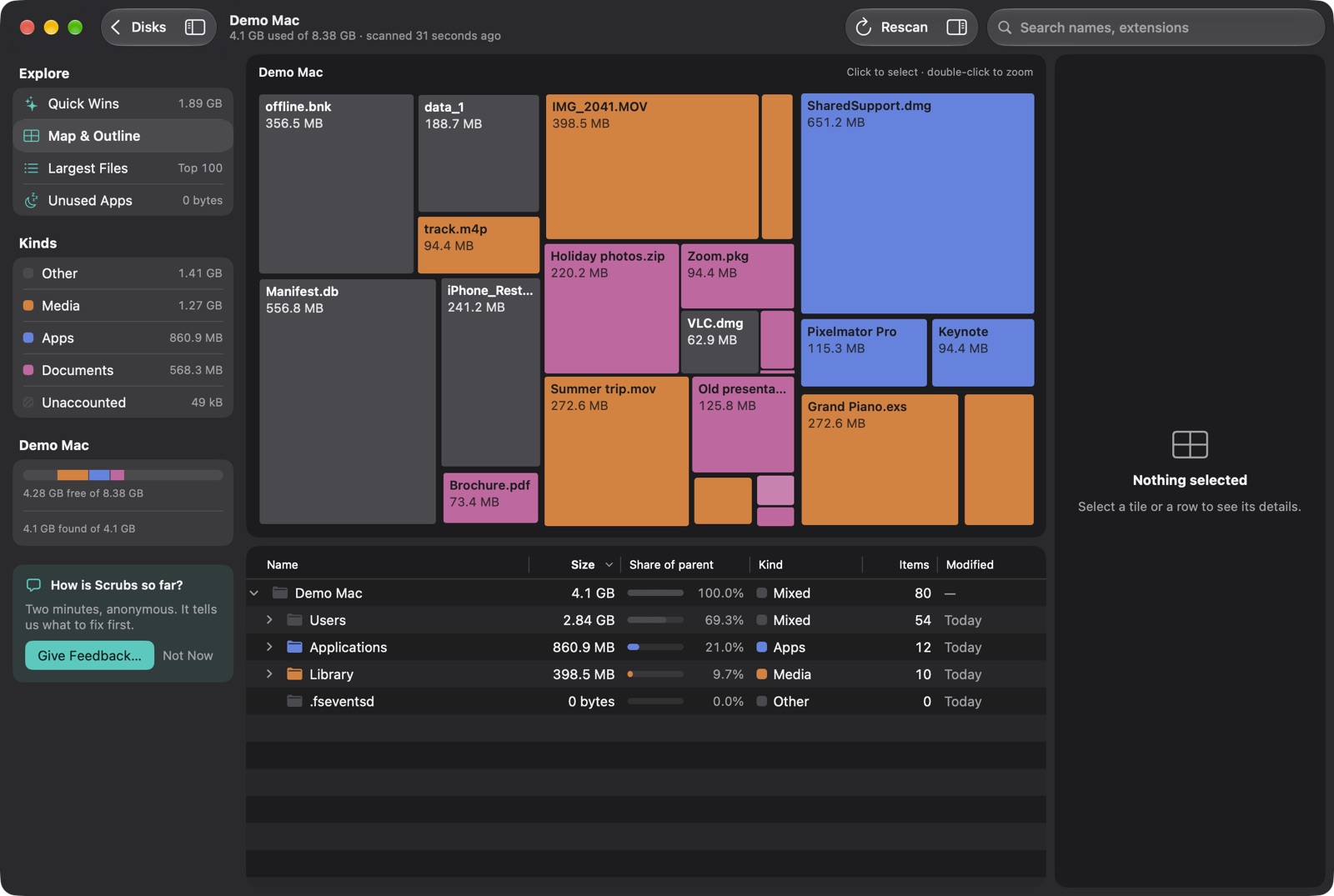
Scrubs maps the whole disk, so folders like the ones above show up as the biggest rectangles without knowing their paths. Its Quick Wins find old installers, Mail's attachment copies, caches and, on a developer's Mac, DerivedData, simulators and old node_modules; iPhone backups and old downloads show under Worth a look, for you to check. Everything you delete goes to the Trash first, with ⌘Z to undo. Scanning is free.
Measured on 1 November 2026 with du on one Mac running macOS 27 with Xcode, Android Studio, JetBrains IDEs and Docker installed. Your sizes will differ; the folders and commands are the same on macOS 15 and later.
About the author: Parsa Nasirimehr is a mobile app developer who builds Scrubs, a disk map for the Mac. Spotted something wrong? Write to support@getscrubs.app.